The Arduino MEGA I got had and issue with automatic reset during sketch upload. The error message in the Arduino IDE looked something like this:
<pre>avrdude: stk500_getsync(): not in sync: resp=0x00
avrdude: stk500_disable(): protocol error, expect=0x14, resp=0x51
I had to hit Reset button just before uploading a sketch. This issue was due to some sort of defect in the Reset capacitor. The fix is very simple: just solder a 100nF capacitor on top of the defect one.
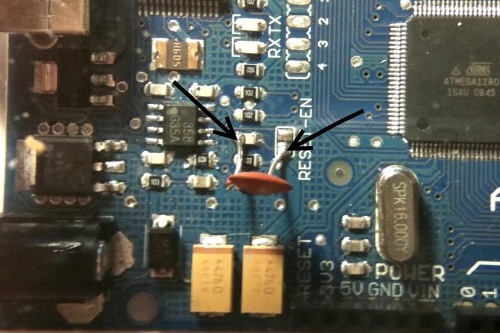
(via)
Hi
I have a DFROBOT Arduino Mega (identical to arduino mega specs) with auto-reset problem, but it’s a bit different in RESET_EN location, I do not know where to solder the 100nF capacitor.
I’d appreciate any help.
Thanks.
Can you send me the link to the board schematics or a photo of the board? I might be able to help you out.
http://www.droboticsonline.com/media/catalog/product/cache/1/image/5e06319eda06f020e43594a9c230972d/a/r/arduinomegaforstore1.jpg
hi
I have the same problem auto-reset \ and every time i want to run a new sketch I have to press reset botton for a while and maybe it works or not
my best regards for who can help me
I’m not 100% sure whether this is the case, because I couldn’t find the schematics of the board for Roboduino MEGA, but it seems similar to the Arduino MEGA.
http://www.arvydas.co.uk/wp-content/uploads/2010/03/Roboduino-mega-reset-fix.jpg
In the image above I marked two rectangles showing where you should solder the 100nF cap on top of the faulty one.
LMK if this helps :)
Hello!
It works!!!!
You saved my day man!
I have a complete circuit on a stripboard with Mega, everything is tangled up. And I cannot upload my sketch. Uh..shi** it thougt. I have to do it again – i thought i burned or short circuited the Mega somehow.
And then I followed your advice and soldered a 100uF cap over. Perfect!
I uploaded on the first try…
Thanx again
You are THE MAN!!!
Google comes up with hundreds of hits on this problem but this is the only solution that fixes it!
If you are ever in East Sussex I’ll buy you a pint!
Happy it worked for you guys :)
Hello
I have the same prob on my arduino pro mini 5v 328, can you tell me where can i do that on it plz ?
I don’t think this issue applies to your Arduino Mini Pro, because it does not have an FTDI chip and you need to have a programmer in order to program it or just use another Arduino to program the Mini Pro.
Hi,
I’m using Arduino Mega 2560 and have the same uploading problem.
Hope you can provide solution on where to solder the suggested capacitor.
Thanks in advance for the help!searched really long for this problem>.<
Regards,
Lee
Hi Lee,
I think these are the spots where you have to solder the capacitor:
http://www.arvydas.co.uk/wp-content/uploads/2011/08/ArduinoMega2650Front-reset.jpg
Good luck! :)
sadly it does not work for me. Will try to use external programmer, thanks for the help!
Need the Luck there!thanks!=)
I had the same problem,
but im used to seeing USB glitches.
when i looked into this problem i discovered that the device wasnt selected in the Adruino sketch ide and the sellected com port had disapeared.
i remounted the usb lead – the port reappeared
and sellected the mega board again.
program compiled no problems
same problem with Mega 1280 -> this helped to solve it!
Thanks!